

A Seamless Finish to Every Purchase
A flawless checkout experience is as important as the beauty of the jewelry itself. When a customer has found the perfect diamond ring or a bespoke bridal set, a sudden checkout error, a spinning payment icon, or a page that simply will not load can turn a moment of celebration into one of frustration. For a brand that promises timeless elegance, every click should feel as refined as the final product.
This guide is designed to help resolve those sudden access issues so your customers complete their purchase with confidence. Whether you are troubleshooting a specific payment gateway error or looking to optimize your store for the long term, the following sections offer practical solutions. Avittam Diamond Jewels, with its commitment to a seamless, luxurious online experience, addresses these common pain points ensuring that nothing stands between your clients and the perfect piece.
Initial Checks for a Stalled Checkout

Before exploring more complex possibilities, start with the simplest solution: refresh your browser's stored data. Occasionally, information from previous visits can interfere with the checkout process. We recommend beginning with this quick step, as it often resolves the issue.
If the page still does not load, try using a private browsing mode. This provides a clean slate, free from any stored data that might be causing a conflict.
Should the problem persist, switch to a different browser or device. For instance, if you are using Chrome on a laptop, try Safari on a tablet or your phone's browser. The issue may be specific to that combination, and this simple change can often pinpoint the cause.
Finally, confirm that your internet connection is stable. A weak or intermittent connection can prevent the checkout from completing smoothly. If you are on a wireless network, try moving closer to the source or use a wired connection. For a brand like Avittam Diamond Jewels, where every purchase deserves a flawless finish, these quick checks help ensure your shopping experience remains as seamless and refined as the jewelry itself.
Resolving Payment and Gateway Errors

Payment errors can be unsettling, but they are often resolved with a few straightforward checks. If your transaction is declined, the first step is to verify that your card details — the number, expiration date, and CVV — were entered correctly. A simple typo is a frequent culprit and can be corrected quickly.
If the information is accurate, your issuing bank may have placed a temporary restriction on the transaction, especially for a higher-value purchase like a fine diamond ring. Contacting your bank directly to confirm there are no blocks and to authorize the payment can resolve the issue. Your bank may also require a one-time password (OTP) or 3D Secure authentication as an additional security step. Completing this prompt verification is essential to proceed.
When a card continues to fail, trying an alternative payment method — such as a different credit card, a digital wallet like PayPal, or a buy-now-pay-later service — can provide a smooth path forward. A well-optimized checkout offers flexibility so you never feel stuck.
At Avittam Diamond Jewels, we pair this payment flexibility with a meticulously curated selection of ethically sourced diamonds and a bespoke ordering service. Our team is always available to personally assist with any payment concerns, ensuring your experience reflects the same timeless elegance as the jewelry itself.
On the merchant side, a sudden checkout failure can indicate that the payment processor — Stripe, PayPal, or another gateway — has become disconnected or misconfigured. Verifying that the processor is active and that its credentials are correct in your store's settings is a critical step. For stores on platforms like Shopify or BigCommerce, checking the payment provider's dashboard for any account holds or decline reasons can reveal the root cause.
Should the error persist after these steps, our dedicated support team is ready to step in and ensure your order is completed without delay.
When the Checkout Loop or Spinner Appears

One of the most frustrating moments during an online purchase is watching a loading spinner spin endlessly — or being returned to the cart page just as you thought you were about to complete your order. This 'infinite loop' symptom often points to a conflict between your browser and the website's scripts rather than a problem with your payment method or account.
The first step is to test whether a browser extension is interfering. Ad-blockers, privacy tools, and even some password managers can block the scripts that load the checkout form. Temporarily disabling these extensions — or testing the checkout in a private or incognito window — will tell you if an extension is the cause.
For those comfortable with a quick technical check, browser developer tools (opened with the F12 key) can reveal the root cause. Switch to the Console tab and look for red error messages, or open the Network tab and filter by Fetch or XHR requests. If a request to update the order review returns a status of -1 or a 403 error, the page is likely being served from cache or blocked by a security rule. This kind of diagnosis is especially valuable on a site like Avittam Diamond Jewels, where a flawless checkout experience should reflect the same care as the craftsmanship of each ring.
A different network can also break a loop if browser-level issues persist. Switching from your home Wi-Fi to a mobile data connection — or vice versa — changes your IP address and routing path, which can bypass a temporary network block or a corrupt local cache. If the checkout completes on the new network, the issue is almost certainly on your device or connection, not the store.
Server-Side and Configuration Fixes

When browser-side steps have been exhausted, the cause of a stalled checkout may reside on the server or in your store's configuration. For a luxury brand like Avittam Diamond Jewels, any interruption at this stage feels particularly jarring. The following checks address the most common server-side culprits.
Verifying Your SSL Certificate
The first and most critical check is your site's SSL certificate. A green padlock icon in the browser address bar confirms a valid SSL, meaning payment information is sent securely. A red padlock or a "Not Secure" warning indicates the certificate is expired, invalid, or missing, which will block checkout entirely — browsers refuse to transmit payment data over an unsecured connection.
To resolve this, visit your store URL in a private window and look at the address bar. If the padlock is absent, the most common fix is to re-issue your SSL certificate through your hosting platform or domain provider. For stores on BigCommerce, the SSL is tied to the domain's DNS — confirming your domain points to the correct servers and that DNS settings have propagated is essential before the certificate can re-provision.
Checking Page Visibility and Payment Gateway Status
A checkout page can become unreachable if its visibility has been accidentally changed. In platforms like BigCommerce, the checkout page may be set to "Hidden" or "Private" after a theme update or accidental toggle in the control panel. Verify that the checkout page's status is "Visible" under Storefront, Web Pages.
The payment gateway itself may be disconnected or stuck in test mode. Navigate to your payment settings (Store Settings → Payments on BigCommerce, or Settings → Payments on Squarespace) and confirm the gateway is listed as "Active," not "Test" or "Inactive." Test mode stops real transactions from processing. If using Stripe or PayPal, check that the account is still connected and that no authorization changes (like a password reset) have broken the link. For Squarespace Payments, verify that the account is verified and that the site's subscription is current.
Identifying Conflicts from Apps and Theme Updates
A recently installed app or theme update is a common cause of sudden checkout failures. Third-party applications — such as shipping calculators, marketing pop-ups, or tax tools — can introduce JavaScript conflicts that block transaction processing. To confirm the culprit, switch temporarily to your platform's default, unmodified theme (like "Cornerstone" or "Vibe" for BigCommerce, or "Storefront" for WooCommerce). If checkout works under the default theme, the conflict lies in your custom theme code or a specific plugin.
Disable recently added apps one at a time, testing checkout after each deactivation. If a particular app resolves the problem, review its configuration or contact its support team. For brands offering bespoke pieces, like Avittam Diamond Jewels, maintaining a clean theme and app ecosystem is essential to preserving a frictionless, trustworthy checkout experience.
When the Customer Cannot Replicate the Error
A particularly frustrating scenario arises when a customer reports a checkout failure that the merchant cannot reproduce. This usually points to a customer-side issue such as an outdated browser, an interfering browser extension, or cached data loading an older, broken version of the page. The first step is to ask the customer for a screenshot of the exact error message, including the browser tab. This detail can reveal whether the issue is a payment decline, a 404 error, or a security warning.
Encourage the customer to clear their browser cache, switch to a different browser (Chrome, Safari, or Firefox), and try from another device, like a mobile phone. If the checkout works from a different device but not their usual one, the problem is isolated to that device's configuration rather than your store's server. For the merchant's part, reviewing your platform's server logs (available under Advanced Tools → Server Error Logs in BigCommerce, or Status → Logs in WooCommerce) can reveal PHP errors or failed API calls tied to the timestamp of the customer's attempt.
| Issue | Likely Cause | Troubleshooting Step |
|---|---|---|
| Green padlock missing | Expired or invalid SSL certificate | Re-issue certificate; confirm DNS points to host |
| Checkout page not found | Page set to Hidden or Private | Set page to Visible in control panel |
| Payment processor error | Gateway disconnected or in Test mode | Reconnect or activate gateway; verify API keys |
| Spinner never stops | JavaScript conflict from app/plugin | Deactivate recent apps; test on default theme |
| Merchant can't replicate | Customer-side browser or cache issue | Ask for error screenshot; test from different device |
| Order review endlessly loads | Caching plugin blocking checkout scripts | Exclude /checkout from all cache layers |
Optimizing the Checkout Experience
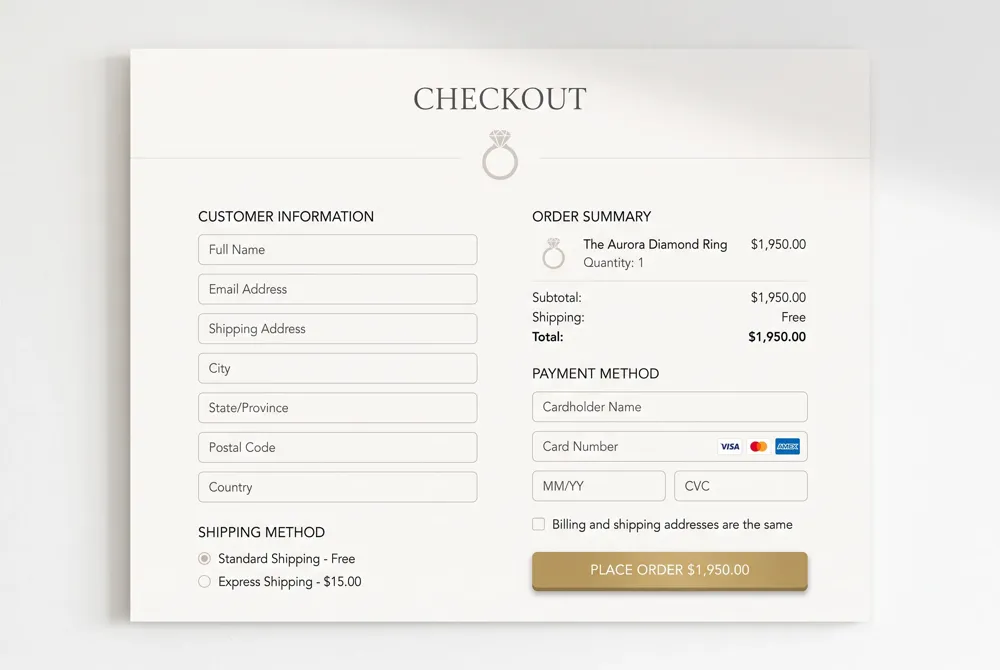
After resolving any technical errors, the next step is to look at the overall flow. A smooth, almost invisible checkout process helps turn a moment of browsing into a lasting purchase. This is especially true for high-end jewelry, where the final steps should feel as polished as the piece itself.
Simplifying the Path to Purchase
A complicated checkout is one of the quickest ways to lose a sale. A significant portion of shoppers abandon orders due to the process being too difficult. One strategy to reduce abandonment is to consolidate the checkout into a single page. This reduces the number of clicks and minimizes the opportunities for a shopper to step away. Avittam Diamond Jewels embraces this principle by ensuring each transaction is straightforward from start to finish, a practice that respects the customer's time and intention.
Another critical refinement is allowing guest checkout. Forcing a shopper to create an account before completing their purchase is a major barrier. Removing this requirement allows the transaction to proceed without friction, while still offering the option to save preferences for future visits.
Building Trust and Showing Progress
Trust is foundational to online luxury sales. Displaying trust signals such as SSL certificates and recognizable payment icons (like Visa, MasterCard, and PayPal) reassures a customer that their financial details are secure. For a newly engaged couple making a substantial purchase, that visible layer of security is a non-negotiable part of the experience.
A progress indicator—whether a simple bar or a numbered step guide—provides a sense of control and reduces uncertainty. It answers the silent question of "how much longer?" and keeps the shopper engaged. Real-time support, such as a live chat option for questions about ring sizing or delivery dates, can prevent hesitation at the final step without forcing the customer to leave the flow.
Payment Flexibility and Mobile Readiness
Offering multiple payment methods is no longer optional. Digital wallets like Apple Pay and Google Pay, along with buy-now-pay-later services, accommodate a wider range of preferences. Nearly half of all shoppers will abandon their cart if their preferred method is missing, making payment flexibility a direct driver of conversions. Avittam Diamond Jewels provides secure options that give customers the confidence to finalize their purchase.
Finally, with global mobile transactions in the trillions of dollars, ensuring the entire process is responsive and fast on a phone is essential. This includes large touch-friendly buttons, autofill for addresses and payment details, and a layout that eliminates the need for pinching and zooming. Every second of load time matters; a fast-loading mobile checkout keeps the feeling of elegance intact, rather than letting it be lost in a frustrating wait.
When to Contact Support
If you have reviewed your device and connection settings and are still experiencing difficulties completing your purchase, we invite you to reach out to our support team. Sometimes, a closer look is needed to ensure everything works seamlessly for you.
Before contacting us, we suggest gathering a few details about what you encountered. Note any messages that appeared on your screen, the time this happened, and the device you were using. A brief summary of the steps you have already taken will help us understand your situation and assist you more efficiently.
Avittam Diamond Jewels' dedicated support team is here to help you personally. When you reach out, please share the details you have collected along with your order information. This allows us to work behind the scenes to resolve the matter and return you to the joy of celebrating life’s most beautiful moments.
A Polished Finale for Every Journey
A smooth checkout is the final expression of the care and craftsmanship that goes into every piece from Avittam Diamond Jewels. If a browser reset, a payment gateway check, or a switch of device brought you back to your order, you have now restored the elegant experience your purchase deserves.
For any remaining questions, our support team is ready to guide you personally. A seamless finish is not just about technology; it is about ensuring that your moment of celebration is as flawless as the jewelry itself.